CII Module Configuration
Reality Hub integrates to your broadcast automation devices through the CII, and this integration allows you to conduct Playout triggering/updating operations.
To reach CII Configuration:
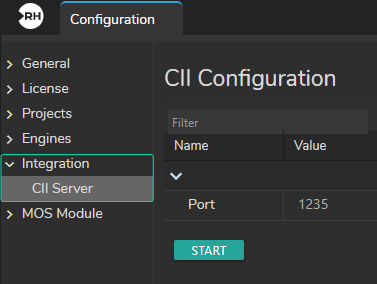
- Click on the Main Menu
- Select the Configuration
- Go to the Configuration sidebar
- Select the CII Server under the Integration
Configuration Details
- The default port for CII on the Reality Hub is 1235.
- To establish communication, you must provide the same port for CII and Reality Hub.
Calling Rundown Items
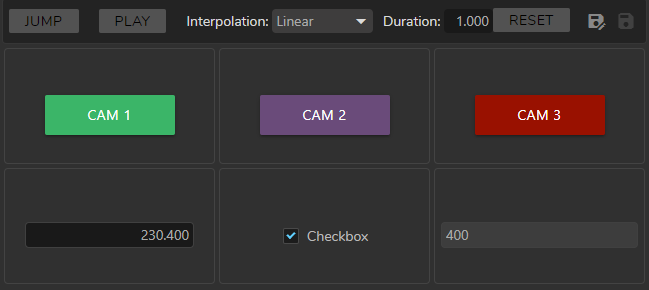
The example in the image above shows that we have one Form Template, three Buttons, and the following variables: Reality String, Reality Boolean, and Reality Integer in the Playout module. This setup is created via the Form Builder module.
Assigning Conditions
- A Button must be assigned with its ID Number.
- A Boolean & Text/String must be assigned with its Key Name.
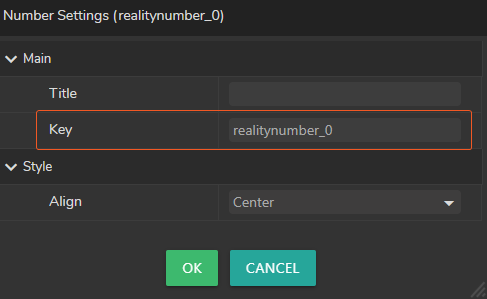
Key Name can be found in the Field Settings of the Component, as shown in the images above.
Trigger a function:
B\UP\<RundownId>_<RundownItemId>\button$<ButtonKey>§1\\<CR><LF>

Update a field's value:
B\UP\<RundownId>_<RundownItemId>\<FieldType>$<FieldKey>§<FieldValue>\\<CR><LF>

Query a rundown item for updatable fields & triggerable functions:
B\AN\<RundownId>_<RundownItemId>\\<CR><LF>

Query specific field and get its current value:
B\AV\<RundownId>_<RundownItemId>\<FieldKey>\\<CR><LF>
You can use the above examples in other CII operations.