Advanced Preview Monitor
Advanced Preview Monitor (APM) is a powerful displaying interface that gives you the ability to preview your Engine scene in real-time right inside the Reality Hub user interface.
APM displays the video on the pin you selected.
To access it:
- Move your mouse pointer over the
Outputpin of theComposite Passesnode and right-click. - Go to Monitor and select Channel - A.
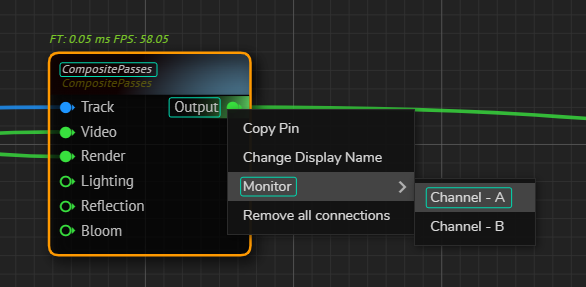
Composite Passes node's Output pin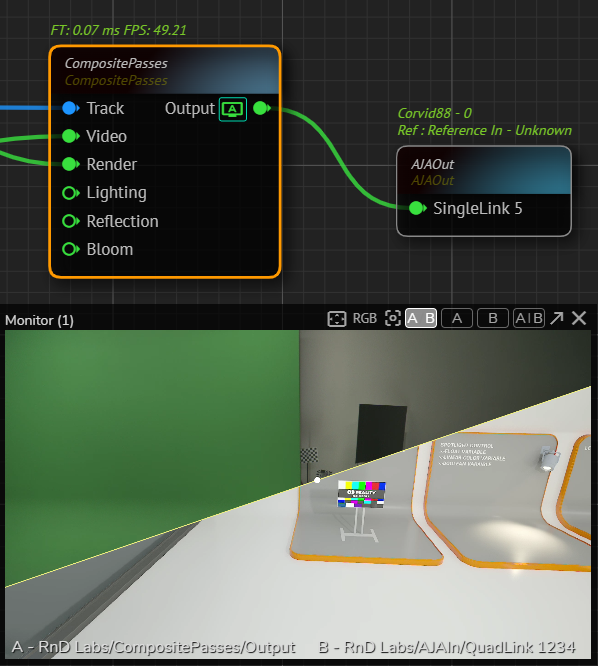
The screen symbol with letter on the Composite Passes node's Output pin indicates the which pin is currently monitored.
Interface
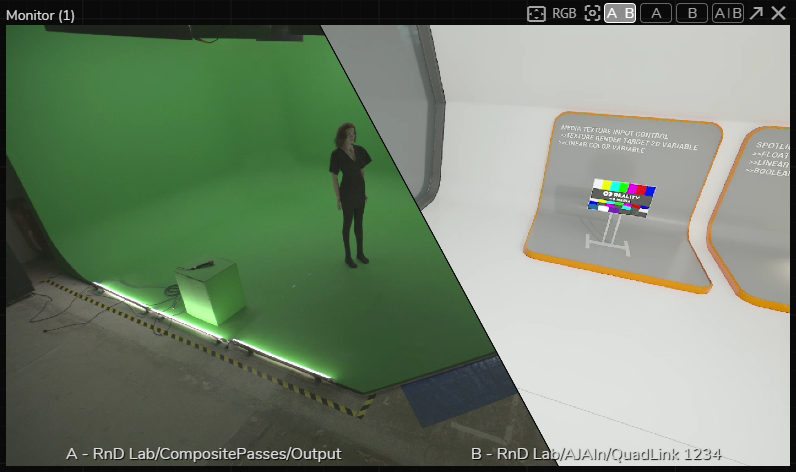
From left to right, APM buttons indicate the following features:

- Safe Area: Borders for action-safe area and title-safe area. It always shows a 16:9 widescreen aspect ratio.
- RGB: This feature allows you to display selected R, G, B, Y (Luminance) channels.
- Zoom/Pan Reset: When you select the Split View, this button gets activated and resets your pan/zoom view into its default state.
- A|B: Multiview allows you to check multiple outputs side by side.
- A: Channel A (Single view)
- B: Channel B (Single view)
- A/B: Split View allows you to check and compare multiple outputs in a unified window. With the help of a splitter, you can check and compare two videos from a 360-degree angle.
- Pop-out: This button allows you to popup APM as a new browser window. This function is helpful if you want to use APM in full-screen.
info
Advanced Preview Monitor is disabled in the Live Mode. For more details, please visit the Launcher Interface.
info
APM for Unreal Engine requires a different workflow. See Advanced Preview Monitor for Unreal Engine