Dynamic Nodes
Dynamic nodes involve creation of connections between compatible pins to facilitate the extraction and manipulation of specific data.
For instance, to obtain Lens Distortion data from a Xync node, you can add a Break node to the canvas and connect the Track output pin of the Xync node directly to the Break node's Input.
Currently, dynamic nodes are follows:
- Arithmetic
- Add
- Div
- Exp
- Log
- Mul
- Sub
- Array
- Break
- Delay
- Indexer
- MakeDynamic
- Sink
- Reroute
Example Dynamic Node for Delaying Zoom
Following sections provides examples of how to use dynamic nodes by providing various methods.
- Add your tracking choice to nodegraph canvas.
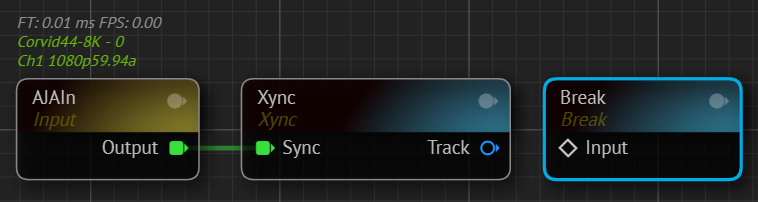
- Add a Break node to canvas.
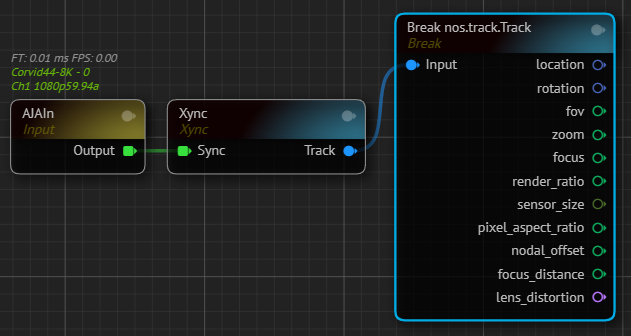
- Connect Track output to the Input pin of the Break node. Since the Break is a dynamic node, it adopts the Track output pin and provides necessary data, as illustrated above.
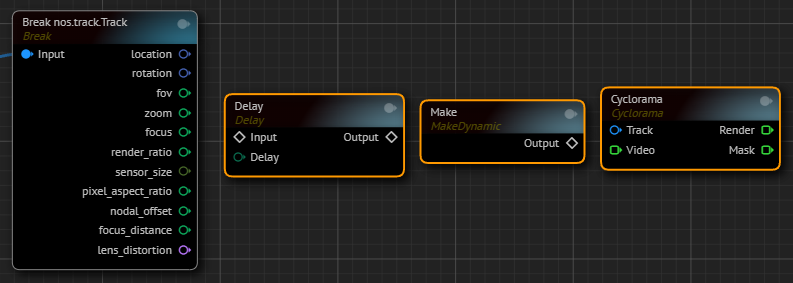
- Add Delay, Make and a node that has a track input, in our case it is Cyclorama node.
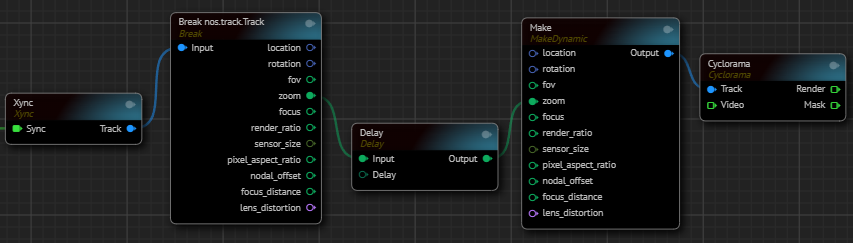
- Connect the Output pin of the Make node into Track input.
- Connect the Break node's Zoom output pin into Delay node's Input pin.
- Connect the Delay node's Output pin into Make node's Zoom input pin.
- Finalize establishment of the remaining connections, as shown above. Now you can delay the zoom by manipulating it with the help of dynamic nodes.
See also Automatic Casting