Calibration
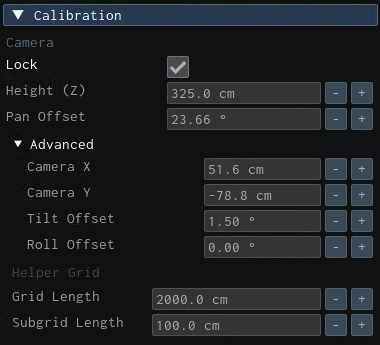
The Calibration property group allows you to fine-tune tracking configuration details, and it contains the following properties:
- Camera
- Lock property allows you to secure your Calibration settings in the current session. This is a convenient feature that prevents accidental changes when clicking on the Camera Viewport by right mouse button.
- Height (Z) property is where you define the Talent Tracking Camera height relative to studio origin in centimeters (cm). For more details, please visit Measuring Camera Height.
- Pan Offset property lets you pan your camera view in the X and Y axes to align your pan to your studio origin.
- Advanced
- Camera X & Y properties show the location of the Talent Tracking camera according to the studio origin.
- Tilt & Roll Offset: This lets you tilt and roll values in the camera view.
- Helper Grid
- Grid & Subgrid Length: Allows you to change the length of the Helper Grid.