Using Plugins
With the Reality 5.4 SP3, utilizing a plugin is straightforward, accessible and can be readily accomplished. We anticipate that the majority of plugins Unreal 5.4.x will be compatible with Reality 5.4 SP3.
danger
It is strongly advised against using plugins that interfere with the rendering process. In other words, plugins that modify rendering are not recommended and may impact the functionality of Reality 5.4 SP3.
Workflow
- Ensure you have Unreal Engine Vanilla 5.4.4 installed.
- Download the desired plugin.
- Navigate to the Plugin folder within Unreal Engine. (Default path:
C:\Program Files\Epic Games\UE_5.4\Engine\Plugins) - Copy the downloaded plugin and paste it into the Plugin folder for Reality Engine 5.4. (Default path:
C:\Program Files\Zero Density\Reality\5.4\Engine\Plugins)
Quixel Bridge Example
For reference, the interaction between Reality 5.4 and Quixel is outlined below:
- Open the Epic Games Launcher application.
- Click on the Library tab.

- Install the Quixel Bridge.
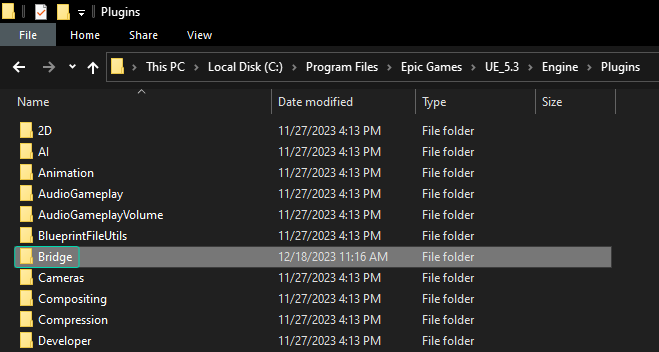
- Navigate to the Plugins folder within Unreal Engine Vanilla.
- Copy the Bridge folder.
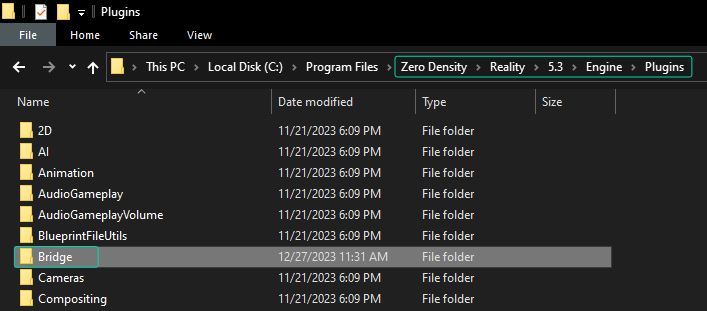
- Navigate to the Plugins folder within Reality 5.4 SP3 and poste it.
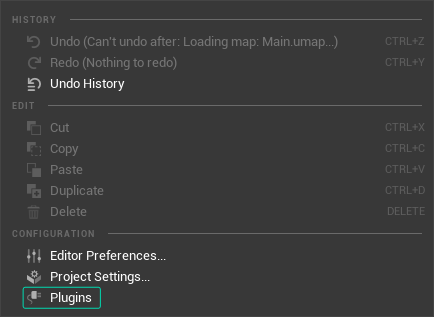
- Launch the Reality Editor, go to Edit > Plugins.
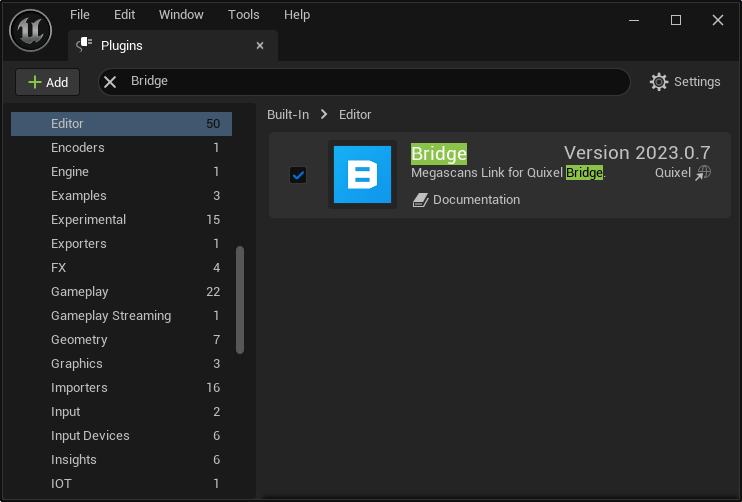
- Find the Bridge plugin, enable it, then restart Reality Editor.

- Click on the Quick Add menu and select the Quixel Bridge.

- Login to your Epic Games account.

Now you can use Quixel Bridge plugin within the Reality 5.4 SP3 with the same experience.