Node Context Menu
In Reality Hub terminology, Node Context Menu refers to a set of options to conduct various operations. When you right click on a node, you will be offered to choose several options to accomplish certain task.
Common Context Menu Items
- Delete Selected Node: Removes the selected node from the nodegraph canvas.
- Create Comment From Selection: See Node Comment
- Change Display Name: Allows you to modify the display name of the selected node for clarity or organization.
- Change Unique Name: Enables you to edit the unique identifier of the selected node.
- Hide Unused Pin: Hides pins on the node that are not currently connected or in use.
- Remove Orphan Pins: Removes the pins that are no longer available or valid.
Unique Context Menu Items
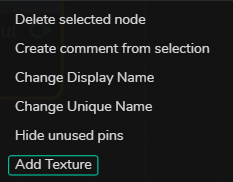
Although most nodes in the Node Library shares the same option, some nodes offer unique options, such as Merge, as illustrated above.