Reality Lino Manager
This section is currently under construction and will be updated soon. Thank you for your patience!
Reality Lino Manager automatically manages and tracks your motion design channels.
Reality Lino Manager:
- Works across multiple engines - If you have multiple engines running, Reality Lino Manager collects channel information from all of them and presents a unified view.
- Detects channel changes - Whenever a channel is added, removed, or modified.
- Updates channel information - Keeps track of all channel details in real-time.
Types of Channels
Reality Lino Manager governs 4 different channels:
Dynamic Channels
Motion Design channels that can be created and modified inside the Reality Hub nodegraph.
Game Viewport Channel
Auto-spawned when Reality Camera added in the Nodegraph.
Project Channels
These are channels that are defined as part of your Reality project structure.
Nodos Channels
This channel is designed for Nodos Form Templates that used to drive UE blueprint-based logic or any node property(s) and events (Non-Motion Design Graphics Templates).
Channel Information
Each channel tracked by Reality Lino Manager contains the following information:
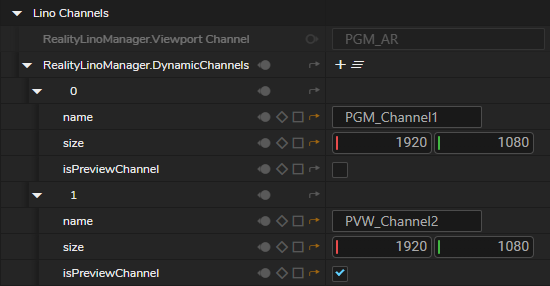
- Channel Identifier - The channel identifier (e.g., "PGM_", "PVW_", and "PVW_Channel1 | PVW_Channel2 | PVW_Channelx | ")
- Display Name - A user-friendly name for the channel (the name without the PGM/PVW prefix)
- Size - The dimensions of the channel (width and height)
- Preview Status - Whether this is a preview channel (PVW) or program channel (PGM)
- Category - The type of channel (Dynamic, Viewport, or Project)
How Channels Are Organized
By Application
Channels are organized by the process they belong to. This means if you have multiple Engines running, each one can have its own set of channels, and Reality Lino Manager keeps them all organized separately.
Across Multiple Engines
If you're running multiple Reality 5 engines, Reality Lino Manager:
- Collects channel information from each engine
- Combines channels with the same name from different engines
- Tracks which engines have which channels
- Provides a unified list that shows all available channels
Channel Relationships
The system automatically detects relationships between channels. For example:
- If you have a channel named "PGM_Channel1" and another named "PVW_Channel1", the system recognizes they're related.
- Related channels are linked together so you can easily see which preview channel goes with which program channel.
Multi-Engine Support
If you're working with multiple engines:
- All channels from all engines are available in one place
- The system handles the complexity of managing multiple sources
- You get a unified view of all available channels
Automatic Management
You don't need to:
- Manually subscribe to channel updates.
- Configure monitoring settings.
- Refresh channel lists.
Everything happens automatically in the background.
Multi-Engine Coordination
If you have multiple engines running different parts of your production:
- Each engine can have its own channels.
- Reality Lino Manager collects them all.
- You get a complete picture of all available channels.
- Related channels across engines are properly linked.