Reality Lino Manager
Channels are organized by the engine process they belong to. When multiple Reality engines are running, each engine has its own set of channels, and Reality Lino Manager keeps these channel sets logically separated and properly managed.
When multiple Reality 5 engines are active, Reality Lino Manager:
- Collects channel information from each engine.
- Groups related channels using channel identifiers and aliases. For example, channels named
PGM_Channel1andPVW_Channel1are treated as related, even if they run on different engines. - Keeps track of which channels run on which engines.
As a result, when a rundown is filled with templates, Reality Lino Manager uses channel identifiers and aliases to link each template to the correct channel(s). In Lino Playout, templates are shown with clear channel information, making it easy to filter and select items for a specific channel or across all channels. This allows the entire show to be controlled from a single, unified Lino Playout interface.
Channel Information
Each channel contains the following information:
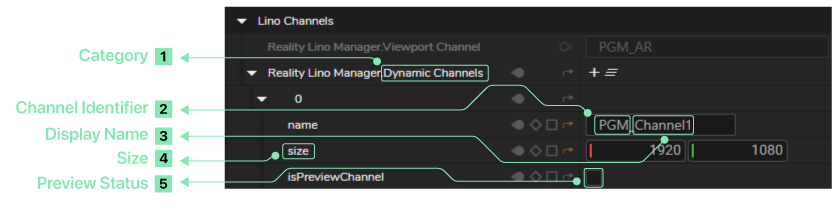
- Category - The type of channel (Dynamic, Viewport, or Project)
- Channel Identifier - The channel identifier (e.g., "PGM_", "PVW_", and "PVW_Channel1 | PVW_Channel2 | PVW_Channelx | ... ")
- Display Name - A user-friendly name for the channel (the name without the PGM/PVW prefix)
- Size - The dimensions of the channel (width and height)
- Preview Status - Whether this is a preview channel (PVW) or program channel (PGM)