File
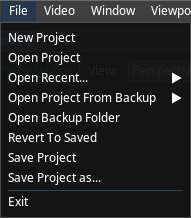
File menu allows you to conduct configuration operations such as loading, saving, etc.
- New Project: Creates a new, empty project.
- Open Project: Opens an existing project file (*.txp) from your computer.
- Open Recent...: Displays a list of recently accessed projects for quick opening.
- Open Project From Backup: Provides options to open a previously saved backup of a project.
- Open Backup Folder: Opens the directory where the software stores project backup files.
- Revert To Saved: Discards all changes made since the last save and reverts the project to its previous state.
- Save Project: Saves the current project, overwriting the last saved version.
- Save Project as...: Saves the project with a new name, creating a separate file.
- Exit: Closes the application.
Backups
Traxis Hub automatically saves the project whenever a change is detected. In addition, each manual save action (whether performed through the menu or by pressing ⌃ CTRL + S) creates a backup copy. The Open Backup Folder and Open Project From Backup menu options can be used to access and restore these backups.
note
Traxis Hub does not allow overwriting a loaded backup project. You must save it under a new file name.