Rundown Area
The Rundown Area is where you build and control your playout sequence.
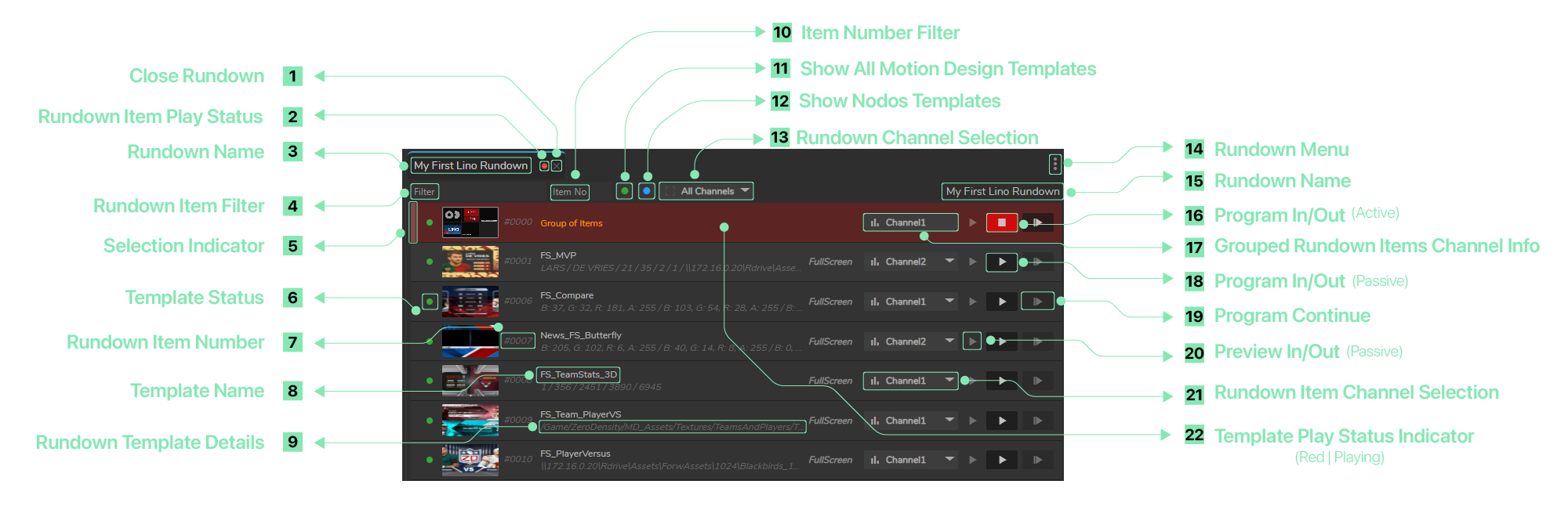
- Close Rundown: Closes the current rundown.
- Rundown Item Play Status: Displays red if a program is played, displays green if preview item is played.
- Rundown Name: Displays the current rundown name (e.g., "My First Lino Rundown").
- Rundown Item Filter: An input field for searching or filtering rundown items.
- Selection Indicator: Icon that indicates which rundown item is selected.
- Template Status: Displays the current status of the template item.
- A green circle indicates the template is online and available.
- A grey circle indicates the template is offline or inaccessible.
- A blue circle indicates the template is based on Nodos.
- An orange circle indicates the item is available only in a Preview channel.
- Rundown Item Number: Shows the rundown template number. You can change the number by double-clicking on it.
- Template Name: Displays the name of the template (e.g., "FS_TeamStats_3D").
- Rundown Template Details: Displays additional information about parameters for the template.
- Item Number Filter: An input field for filtering rundown items by their item number.
- Show All Motion Design Templates: A toggle that, when enabled, displays only Motion Design templates that are available.
- Show Nodos Templates: A toggle that, when enabled, displays only templates that belong to Nodos.
- Rundown Channel Selection: A dropdown to filter rundown items by specific output channel(s).
- Rundown Menu: Opens a context menu for rundown-specific actions (e.g., editing, deleting).
- Rundown Name (Header): Displays the current rundown name in the header (e.g., "My First Lino Rundown").
- Program In/Out (Active): Buttons to control the live broadcast of the rundown item, allowing you to put the item on-air ("In") or take it off-air ("Out"). If it is red, it indicates the associated item is actively playing.
- Grouped Rundown Items Channel Info: Text showing the channel assigned to a grouped item (e.g., "Channel1").
- Program In/Out (Passive): A button used to put the item on air.
- Program Continue: Icon that continues the program flow; with sequences and Stop markers, it advances from the current marker to the next, then pauses for the next Continue trigger.
- Preview In/Out (Passive): A button used to preview the rundown item without putting it on air.
- Rundown Item Channel Selection: A dropdown within each rundown item row (e.g., "Channel1", "Channel2") to change the channel for that specific item.
- Template Play Status Indicator (Red | Playing): Indicates an item is actively playing.