General Configuration
The General Configuration is status dashboard and maintenance center for your Reality Hub Server. It shows your Reality Hub version and hardware specs at a glance, while also letting you perform key tasks like downloading the Reality Loader, resetting the UI, and setting the Actions timeline frame rate.
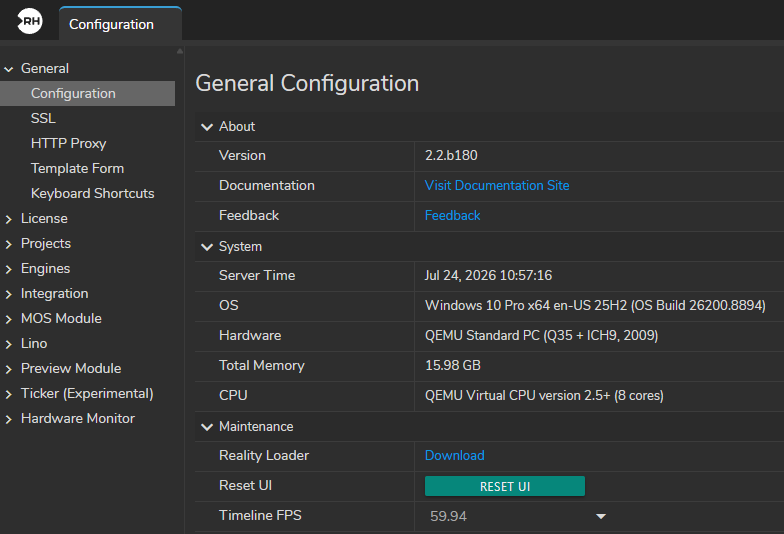
About
Displays version information and provides access to support resources.
- Version: The installed version and build number of the Reality Hub (e.g.,
2.2.b180). - Documentation: A clickable link that opens the official documentation site.
- Feedback: A clickable link for submitting feedback or issues.
System
Displays the Reality Hub Server system's technical specifications and status.
- Server Time: The current system date and time of the machine running Reality Hub.
- OS: The Reality Hub Server operating system, architecture, and build version (e.g.,
Windows 10 Pro x64 en-US 25H2). - Hardware: The hardware platform or virtualization type detected (e.g.,
QEMU Standard PC). - Total Memory: The total amount of installed system RAM (e.g.,
15.98 GB). - CPU: Processor model and the number of logical cores (e.g.,
8 cores).
Maintenance
Provides utilities for managing Reality Hub and its associated components.
- Reality Loader: A download link to obtain the Reality Loader comes with the version.
- Reset UI: A button that resets the Reality Hub interface to its default layout and settings.
- Timeline FPS: A setting to define the frame rate (in fps) for timeline-based Actions and animations (e.g.,
59.94).