Matching Camera Pan
ZED X Camera is equipped with sensors and can automatically measure the tilt and roll angles and it can detect if the tilt and/or roll has changed.
info
Talent Tracking software warns you if it detects more than 2 degrees of change in the ZED X camera after the calibration.
Setting the Camera Pan
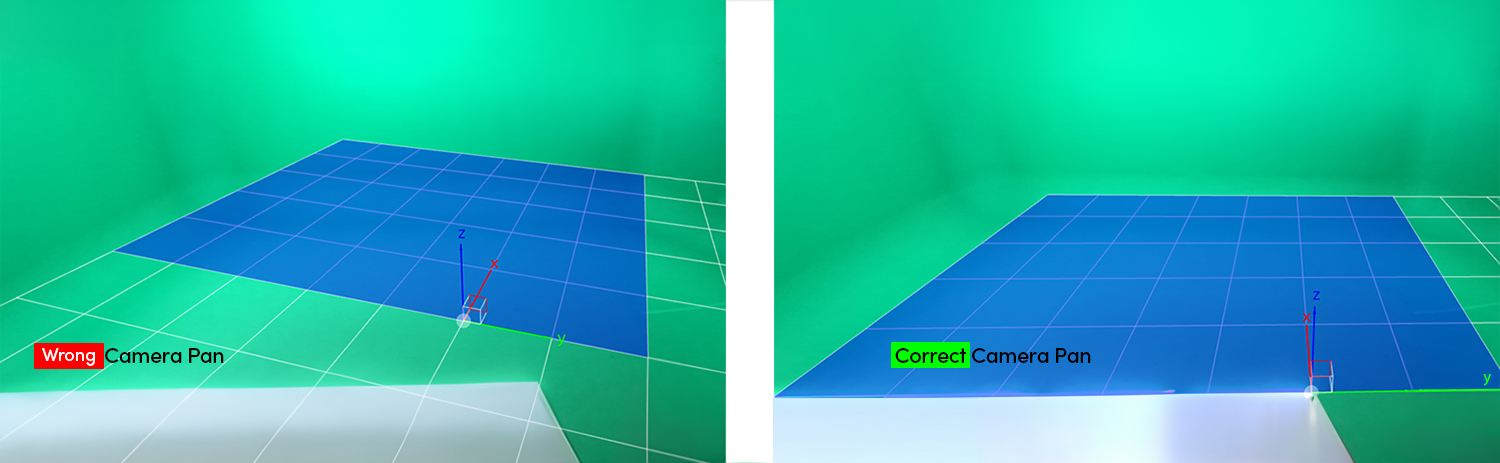
- Click and hold on the keyboard r button
- Scroll the mouse wheel up or down
- Align the Camera View Grid to your Studio Axes
As soon as you scroll your mouse wheel up or down, the Helper Grid inside the viewport changes. It also affects Pan Offset (°), Camera X, and Camera Y properties.
info
You can also conduct the same procedure above by changing property inputs manually.
info
Coordinates inside the user interface always show positive axes.
info
CTRL + r + mouse wheel combination decreases the Pan Offset (°) value changes. It is a handy feature for more refined adjustments.