Transitioning to New Launcher
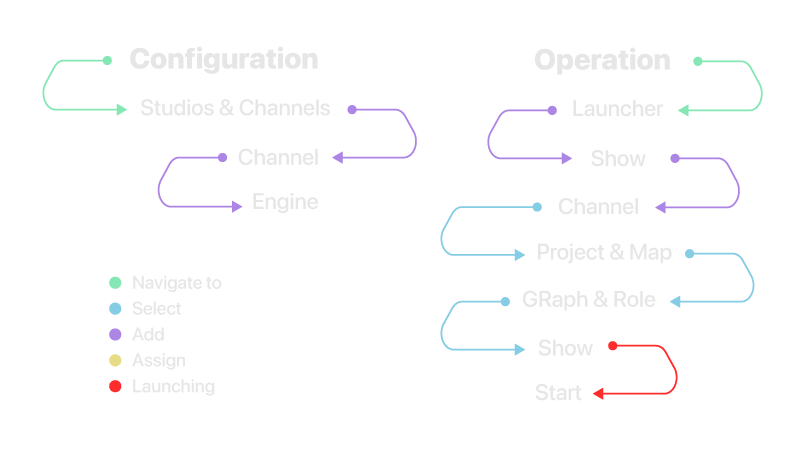
With version 2.0 of Reality Hub, the Launcher module has been completely redesigned, resulting in significant changes to its operation. For detailed information, please visit New Launch Configuration
The new Launcher introduces a variety of features, including an enhanced user experience for multiple engine configurations, improved compatibility with real-time broadcast pipelines and the new Lino module, and a clean, modern interface with a refreshed design.
Additionally, several visual indicators such as RAM and VRAM usage have been removed, as the Hardware Monitor now provides detailed information about your hardware metrics. For further details, see the Launcher Interface.
Adopting the new Launcher is straightforward due to its hierarchical approach, with clearly defined categories.
Core Concepts
- Show: Show refers to a structured, complete production unit that acts as a parent container for your Channels and Engines.
- Channel: Channel is a designated configuration targeting specific Engine(s). Channels allow you to select a particular group of Engines that will render your graphics. In other words, Channels organize how your graphics are distributed across different Engines.
- Roles:
- Preview: This mode allows you to play your content in a designated preview engine.
- Program: This mode allows you to play your content in a designated program engine.
- Offline Mode: This feature provide you a various Rundown controls without an engine hardware.
Please keep this in mind: the content you display in the preview engine does not affect the program engine even if you are using the same content.
You can create multiple Channels to target different Engines. For more information, please refer to the Multi-Camera and Multi-Graphics Scenario.