Custom Launch Parameters
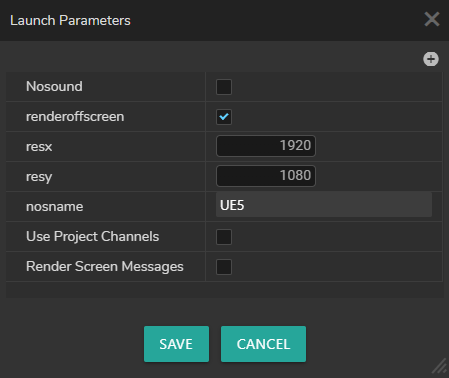
Custom launch parameters allow you to launch your Show with a certain flags such as nosound, d3ddebug, etc.
| Parameter | Description |
|---|---|
| nosound | Disables audio output during launch. |
| renderoffscreen | Renders content offscreen (without displaying on a physical monitor). |
| resx / resy | Sets the screen resolution (e.g., 1920x1080). Controls the size of the rendering target. |
| nosname | Assigns a custom name (e.g., "UE5") for identification. |
Use Project Channel New | When enabled, this paramerter allows you to use Project (Broadcast) Channels defined in the project. |
| Render Screen Messages | Displays screen messages (e.g., stat fps, error logs) as overlays in the viewport. |
Engine Display Window

If you disable renderoffscreen property, you scene will launch with an engine display window, as shown above. This window is sometimes called the Game Preview Standalone or the Render Preview Output.
important
Closing the Engine Display Window stops your Engine.
info
Minimizing the Reality 5 display window might affect your performance. You can leave it aside or keep it in the background.
Instead of going back and forth to the Engine Display Window to check your scene, you can utilize the Advanced Preview Monitor feature without leaving the Reality Hub interface.
See also Advanced Preview Monitor.