This section is currently under construction and will be updated soon. Thank you for your patience!
Rundown Menu
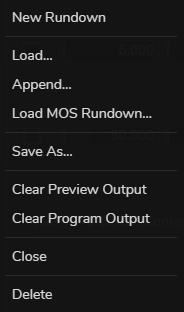
Rundown Menu enables you to perform various rundown operations, such as creating a new rundown, loading a previously saved rundown, or appending to an existing one.
New Rundown: Creates a new rundown.
Load: Opens a previously saved rundown.
Append: Adds new graphics to the end of the current rundown.
Load MOS Rundown: Imports a rundown created in a MOS system, a common broadcast automation platform.
Save As: Saves the current rundown with a specific filename.
Clear Preview Output: Force clears the preview of the graphics from the screen.
Clear Program Output: Force clears every graphics that have been sent to the broadcast output.