Create Object
In Traxis Hub, tracked entities are called Objects, or sometimes Tracked Objects. A Tracked Object can be a camera, a person, or any other device. For Traxis Hub, a studio camera is just a tracked object with a lens.
Add a New Object
- In Traxis Hub, open the Objects pane and click New to add a new tracked object.
- Select the object and show its properties.
- In the General section, set a friendly name to the Object (such as "PTZ-FR7" or "CraneCam").
- In the General section, set Has Lens to true.

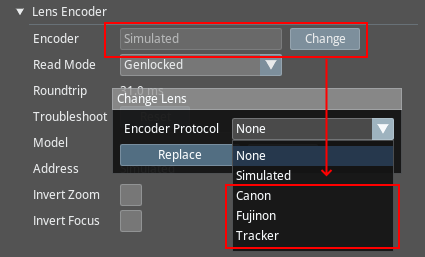
- In the Lens Encoder section, set Encoder Protocol as Tracker for FreeD trackers (such as PTZ), and to Canon or Fujinon depending on your lens for TrackBody trackers.
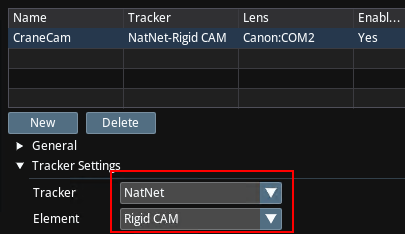
- In the Tracker Settings section, set the Tracker that you created in the previous step, and set the element accordingly. FreeD streams carry only one tracked element, whereas NatNet can carry multiple tracked elements.