MagicWand Output
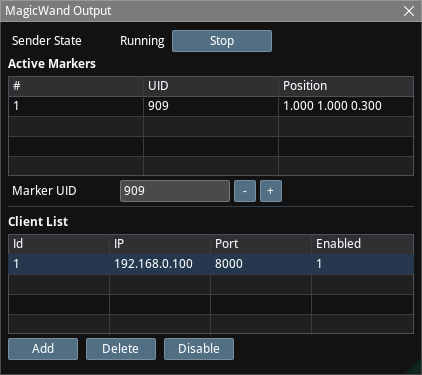
MagicWand is a hardware device with an active OptiTrack marker, which can be enabled and disabled by pressing and releasing a button. When enabled, the precise location of the marker is sent to your targeted pipeline.
Process
- The Active Markers list shows the markers detected by the OptiTrack tracker. Markers have unique IDs during a system run; however, these IDs might change when the system is restarted.
- Enter the ID of the marker that you want to use as the Magic Wand.
- Enter the IP and port of the FreeD receiver that you want to send the track information to.
- Only the Location data of the FreeD track stream will be meaningful; all other data will be zero.
- Click on the Start button to start sending the data.
- When the marker is located and tracked via the tracker, the FreeD stream will include the Location of the marker.
- When the marker is not located (e.g., because the power is off), then the Y coordinate in FreeD packets will be negative. Note that this cannot happen under normal conditions because a marker cannot be below the ground.