Sync Source
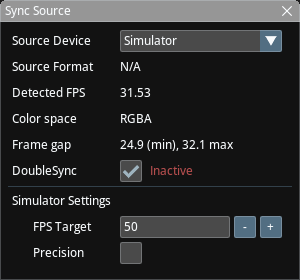
Sync Source allows you to configure sync sources. Although Traxis Hub can work with both internal (software) and external (Decklink) sync clocks, an external genlocked source is required for production.
General Settings
- Source Device: Displays the DeckLink source and its corresponding channel that will be used as the clock source.
important
NodosLink device is experimental and requires Nodos 1.3 with an installed Traxis HubIO plugin.
- Source Format: Indicates the video resolution and frame rate at the source.
- Detected FPS: Displays the frame rate of the source signal.
- Color Space: Shows the format of the video signal.
- Frame Gap: Min/Max interframe gaps for the last few seconds. This should be very stable for production. This indicator can be used to diagnose clock input issues.
- DoubleSync: Activates a video synchronization technique for interlaced input signals. When active, a 50i video source will result in a 50 fps track output, even though Decklink uses a 25fps interleaved clock. This setting has no effect when the selected video source is progressive.
info
When using Decklink as the sync source, always select Enable DoubleSync if your input is interlaced.
Simulator Settings
- FPS Target: The target FPS for the Simulator sync source.
- Precision: When set to On, the Simulator uses a busy wait algorithm instead of timers. The result is very precise but has high CPU consumption.