Configuration
Open Configuration > Ticker (Experimental) > Settings.
General
- Default Ticker Speed: Speed used for new ticker groups (range 1–100). Individual groups can override this in their own settings.
Data Source Configuration
SQL Query
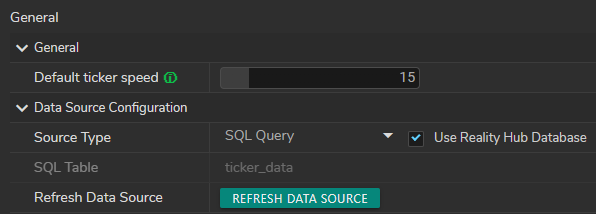
When SQL Query is selected, the Use Reality Hub Database checkbox appears next to Source Type.
- Use Reality Hub Database enabled: reads from the built-in
ticker_datatable (SQL Table is set toticker_data). - Use Reality Hub Database disabled: connects to a Remote Database.
Remote Database fields:
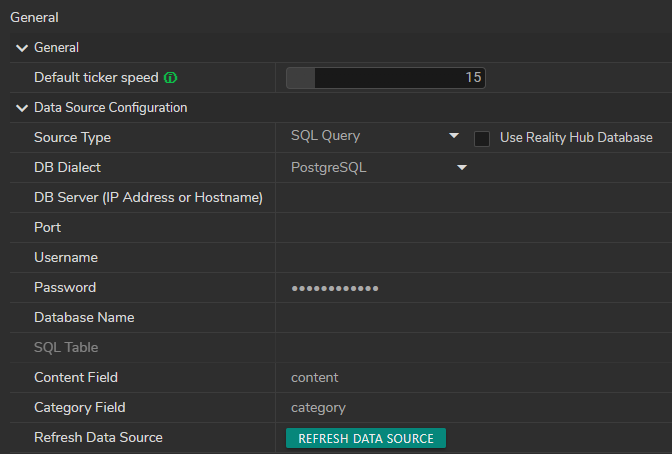
- DB Dialect (PostgreSQL or MySQL)
- DB Server (IP Address or Hostname)
- Port
- Username
- Password
- Database Name
- SQL Table — choose a table after connection
- SQL Query — alternatively, enter a single
SELECTstatement when no table is selected (read-only; no semicolons) - Content Field / Category Field — column names for ticker text and category (defaults:
content,category)
File Sources
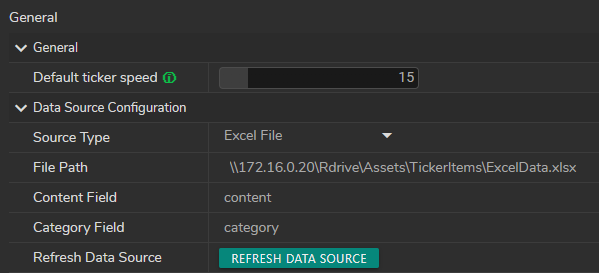
For Excel File, CSV File, or Text File:
- File Path: Path to the file on the Hub server
- Content Field / Category Field (Excel and CSV): Column names in the file
Supported extensions:
- Excel:
.xlsx,.xls - CSV:
.csv - Text:
.txt,.jsonl,.ndjson(one JSON object per line)
Refresh Data Source
After configuring a source, click Refresh Data Source to load items from it. In the News Pool, use the Refresh toolbar button to reload.
info
When a remote SQL, Excel, CSV, or Text source is active, Add and Delete in the News Pool are disabled. You have to manage content at the source. Manual mode and SQL with Use Reality Hub Database still allow Add and Delete.