MouseKeyboard
The MouseKeyboard tracker enables you to move and rotate the location and orientation values using the mouse and keyboard.
Process
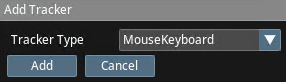
- Add the MouseKeyboard tracker to Traxis Hub and associate it with a tracked object.
- In the Viewport menu, select your tracked object.
- Press and hold the right mouse button.
- Move the mouse and use W/S/A/D keys to move the tracked source point.